Open a supported invoice
Visit a supported Stripe invoice page or AWS billing page in Chrome.
InvoiceTidy quietly renames supported Stripe and AWS invoice PDF downloads using their date and USD total. You download normally. Your filenames come out tidy.
HOW IT WORKS
No dashboard to learn. No PDFs to upload. Just one less thing to tidy up manually.
Visit a supported Stripe invoice page or AWS billing page in Chrome.
InvoiceTidy checks available page details and the PDF download information locally.
When the date and USD total are clear, Chrome saves the PDF with a useful name.
No more opening a stack of PDFs to figure out which invoice is which. Here's an illustrative example of the naming format.
Actual renaming depends on a supported download and confidently detected invoice details.
THOUGHTFULLY SMALL
No manual rename button. A qualifying invoice gets a clearer filename as it downloads.
Built for eligible PDFs from Stripe and AWS billing workflows.
Invoice details are processed inside Chrome. PDF contents aren't uploaded to an InvoiceTidy server.
Ambiguous or unsupported downloads keep their original filename.
SIMPLE PRICING
Start free. Only pay if InvoiceTidy earns its keep.
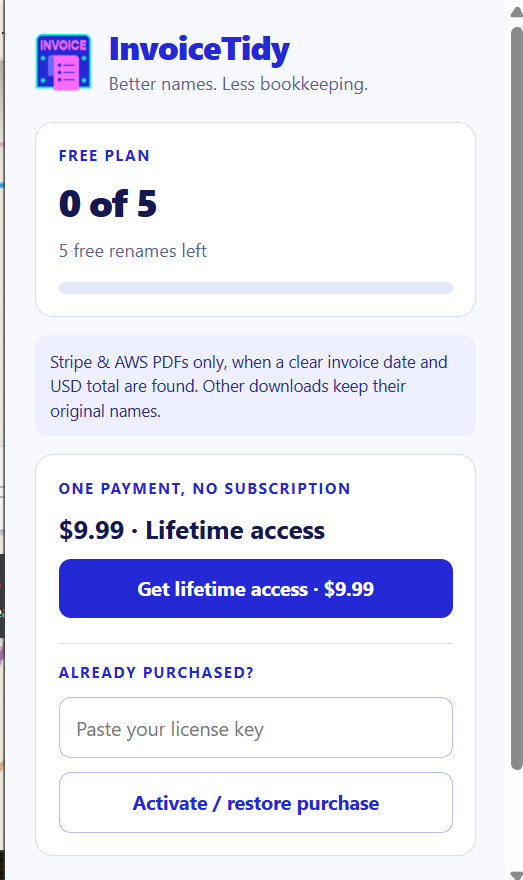
See whether InvoiceTidy fits your workflow.
Unlock unlimited eligible automatic renames.
Payment is processed by Dodo Payments through its hosted checkout. Actual checkout price is shown before purchase.
PRIVACY WITHOUT THE FINE-PRINT FOG
InvoiceTidy only needs a few details to name a file. Here's exactly what happens and what doesn't.
Read the full privacy policyThe extension does not send PDF contents to a document-processing server.
Detected invoice date and amount are used locally to name eligible downloads.
Dodo Payments receives your license key and activation identifier for license verification.
THE COMPLETE POLICY
Effective date: · Applies to the InvoiceTidy Chrome extension and this website.
InvoiceTidy is a Chrome extension that renames certain Stripe and AWS invoice PDF downloads. The extension processes supported invoice details locally in your browser. It does not upload your invoice PDFs or their contents to an InvoiceTidy server. If you buy a lifetime license, activation and license checks involve Dodo Payments.
On supported Stripe webpages and AWS billing pages, InvoiceTidy can read the text visible on the page to identify invoice dates and USD amounts. On AWS, its invoice extraction is limited to billing and cost-management pages. On Stripe domains covered by the extension, it checks visible page text for invoice-related labels.
With Chrome's Downloads permission, the extension checks download metadata such as the original filename and source or referring URL to decide whether a PDF qualifies for renaming. It does not read the downloaded PDF's contents. It does not intentionally read pages outside its supported Stripe and AWS domains.
The extracted vendor, invoice date, and amount are used to generate a filename such as Stripe_2026-10-14_$49.99.pdf. If the details are ambiguous, the original filename is left alone.
InvoiceTidy uses Chrome's extension storage for:
This information isn't sent to the InvoiceTidy developer as an invoice dataset. Chrome manages the local storage on your device.
Optional lifetime purchases open a Dodo Payments hosted checkout. Dodo Payments collects and processes the payment and customer details needed for the purchase, according to its own policies. The InvoiceTidy extension doesn't collect card details.
When you activate a purchase, the extension sends your license key to Dodo's licensing service over HTTPS. Activation also provides an activation label and receives an instance ID. Later license checks send your license key and instance ID to Dodo. The extension ordinarily rechecks valid licenses about once a week, and supports a limited offline grace period when the licensing service is temporarily unavailable.
Invoice text, amounts, filenames, and PDF contents are not included in these license requests. Payment and licensing records kept by Dodo are subject to Dodo's own retention and privacy practices. Learn more at Dodo Payments' data processing information .
This website is a static product page. The supplied website code uses no analytics scripts, advertising pixels, behavioral tracking, or cookie banners, and it does not set its own tracking cookies. The website does not have a contact form or account system.
The company that hosts the website may automatically process normal technical information, such as IP addresses and server requests, under its own policies. Following links to the Chrome Web Store or Dodo Payments takes you to their services, which have separate privacy practices. If you email support, your message and email address may be used to respond to your request.
Temporary invoice context is short-lived and isn't retained as a permanent invoice archive. The successful-rename counter and an activated license remain in Chrome's extension storage until you clear that storage or uninstall the extension. You can use the extension's Deactivate on this browser control to release a license activation, provided the licensing service is reachable.
Removing the extension does not erase purchase or tax records held by Dodo Payments. For questions about Dodo's records, follow Dodo's own support and privacy channels. For questions about InvoiceTidy's data handling, use the publisher's support contact described below.
InvoiceTidy uses browser-local processing for invoice extraction and HTTPS requests when communicating with the Dodo licensing service. Local data is subject to Chrome's storage and device security controls. No online service or device can be guaranteed completely secure.
InvoiceTidy uses website and download data only to provide its disclosed invoice-renaming feature, related access management, and necessary troubleshooting. The extension does not sell user data, use it to target advertising, or transfer invoice data to unrelated third parties. Human access to your invoice contents isn't part of the service.
The publisher is the developer listed on the InvoiceTidy Chrome Web Store listing. For privacy questions, assistance, or requests regarding data you have voluntarily provided, contact the publisher using the support information on that listing.
We may update this policy when InvoiceTidy's features, services, or data practices change. The current version will be posted here with a revised effective date. Material changes will be disclosed as required by applicable Chrome Web Store policies and law.
GOOD QUESTIONS
Everything you need to know before giving InvoiceTidy a spot in your toolbar.
No. The current version only attempts to rename supported Stripe and AWS invoice PDF downloads when a clear invoice date and USD total can be detected. Other files keep their existing filenames.
Not yet. Version 1.3.0 currently supports USD amounts only. Multi-currency support may be considered for a future release.
No. InvoiceTidy uses text visible on supported billing pages and Chrome download metadata to determine a filename. It does not read PDF file contents or upload them to an InvoiceTidy server.
Your normal downloads continue, but InvoiceTidy stops automatically renaming eligible invoices unless you activate a lifetime license. The $9.99 purchase is one-time, not a subscription.
Use the purchase button in the extension to open Dodo's checkout. After buying, enter the issued license key in the extension's “Activate / restore purchase” field.
No. InvoiceTidy renames eligible PDFs when you download them from supported pages. It doesn't search historical orders or bulk-download invoices.
A LITTLE MORE TIDY, EVERY DAY
Five free renames. No subscription. Simple as that.
Get InvoiceTidyThe Chrome Web Store link will appear here when the listing is live.